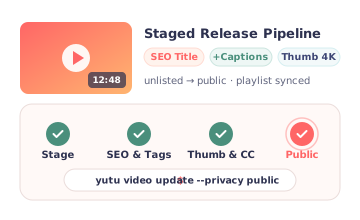
Stage, optimize, and publish
Upload to an unlisted queue, enrich SEO metadata, attach thumbnails and captions, and route into playlists in one flow.
Plan, publish, optimize, and respond from one
repeatable workflow,
so every upload gets sharper metadata, stronger packaging,
better
session paths, and timely community follow-up.
Features
Stage unlisted uploads, sharpen titles and thumbnails, sync playlists and captions, moderate comments and live chat, or hand the entire growth loop to an AI agent.
Upload to an unlisted queue, enrich SEO metadata, attach thumbnails and captions, and route into playlists in one flow.

Coordinate scheduled uploads, multilingual captions, and series playlists from repeatable CLI scripts or CI jobs.

Update titles, first-two-line descriptions, tags, custom thumbnails, and channel branding without opening YouTube Studio.

Inspect video stats, search rankings, captions, and playlist structure to spot and fix underperforming uploads.

List recent comment threads, post release-hour prompts, and reply to top questions directly from your terminal or agent.

Flag spam, set comment moderation status, manage live broadcasts, and enforce live chat bans before noise takes over.
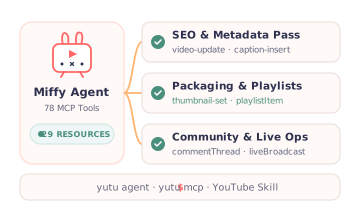
Launch the built-in Miffy agent or connect any MCP client to 78 tools across all 29 YouTube resource types.

Separate read, write, and destructive operations so agents verify resource IDs first and ask before deleting anything.
Quick Start
Put yutu where planning, publishing, and optimization already happen: terminal, scripts, CI, or an agent workspace.
Create OAuth credentials in Google Cloud.
Authorize once to run automated workflows across your channel.
Run the next upload, packaging review, comment pass, or assistant-driven channel audit.
Ready to try yutu?
Or set up yutu manually.
Choose the package manager or runtime that matches your environment.
Install the CLI globally when Node is already part of your tooling.
Run yutu in a container with OAuth files mounted.
Install the latest binary directly from the Go module.
Use the release installer script for Linux environments.
Use Homebrew on macOS, or fall back to the same script on Linux.
Install yutu on Windows from the WinGet package.
Connect yutu to any MCP-compatible client.
yutu is free and open source. If it saves you time, a coffee helps keep the releases, fixes, and docs coming. Scan a code with your phone to chip in. Thank you!
No money? A star on GitHub helps just as much.